1. Overview
1.1 AtragMx from Horus Vision
Horus ATragMX software considers atmospheric conditions, gun data, ammunition, range, speed and muzzle velocity to calculate precise aiming solutions with “come-up” results – and even accounts for Coriolis and spin drift effects. ATragMX, loaded on a handheld computer made by TDS Recon, is easy to use and lightning-fast. The Recon meets the rigorous MIL-STD-810F military standard for drops, vibration, humidity, altitude and extreme temperatures.
2. Requirement
3. Usage
3.1 Opening the AtragMx
3.1.1 Interaction Menu
- Open the self interaction menu Ctrl + ⊞ Win
- Select
Equipment - Select
Open AtragMx
3.1.2 Custom key
OPTIONS/CONTROLS/CONFIGURE ADDONS/ACE3 Equipment
3.2 Example with M14 and default 7.62mm 20Rnd Mag
Start of the mission:
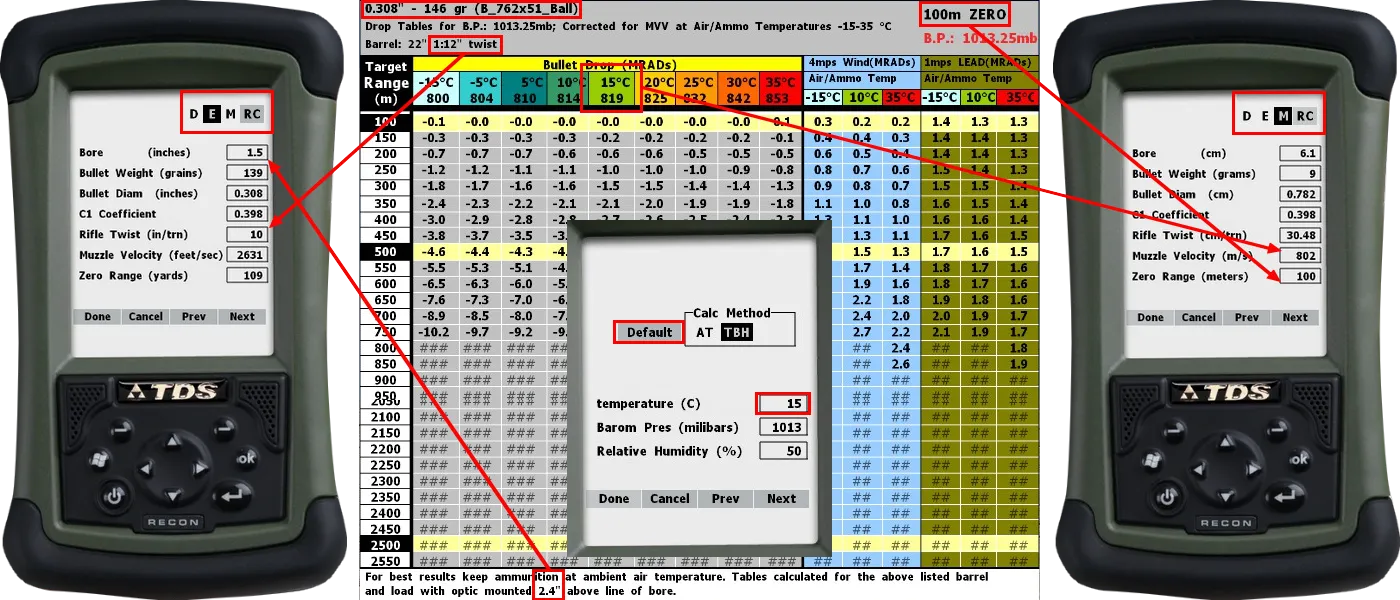
- Open the Range Card and check the cartridge, the zeroed distance, the rifle twist, the muzzle velocity at 15°C and the bore height.
- Open the AtragMx and the
Atmsphrcolumn, selectDefaultandDone. [Manual] Open Gunthe 7.62x51mm M80 in theGunList. [Manual]- Select
E(English unit) at the top right. [Manual] - Open the
Guncolumn, check and update theBore, theRifle TwistandDone. - Select
M(Metric unit) at the top right. - Open the
Guncolumn, check and update theMuzzle Velocity, theZero RangeandDone. - The Muzzle Velocity Table will be automatically updated. [Manual]
- (Must be edited manually for specific cartridges according with the range card)
- Optionally,
Save GunandDonein theGunList.
In position:
- Update the
Atmsphrcolumn with the Kestrel 4500 andDone. - Check the new
Muzzle Velocityin theGuncolumn. - Update the
Targetcolumn (the wind arrow will also help). [1] [2] [3] [4] - The latitude for all common maps can be found in the ACE3 Github.
- Apply the vertical and horizontal elevations on the scope.
- Control the breath and press.
3.3 Example with Truing tool
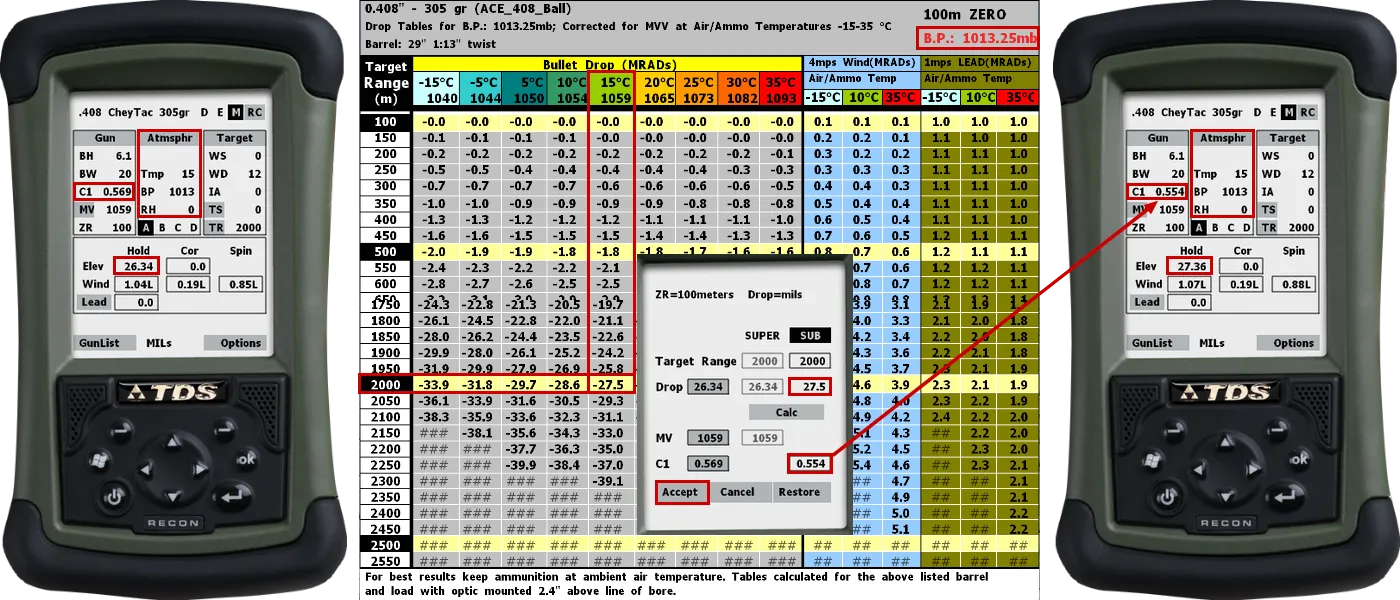
- Open the
Truing Dropin theOptionsmenu. [Manual] - Add the actual
Target Rangein theSUPERcolumn andCalc. - Add the same
Target Rangein theSUBcolumn andCalc. - Apply the actual scope elevation in the
Dropfield andCalc. Acceptthe newC1,Guncolumn andElevare updated.- The Drag Coefficient Table will be automatically updated. [Manual]
- Optionally,
Save GunandDonein theGunList.
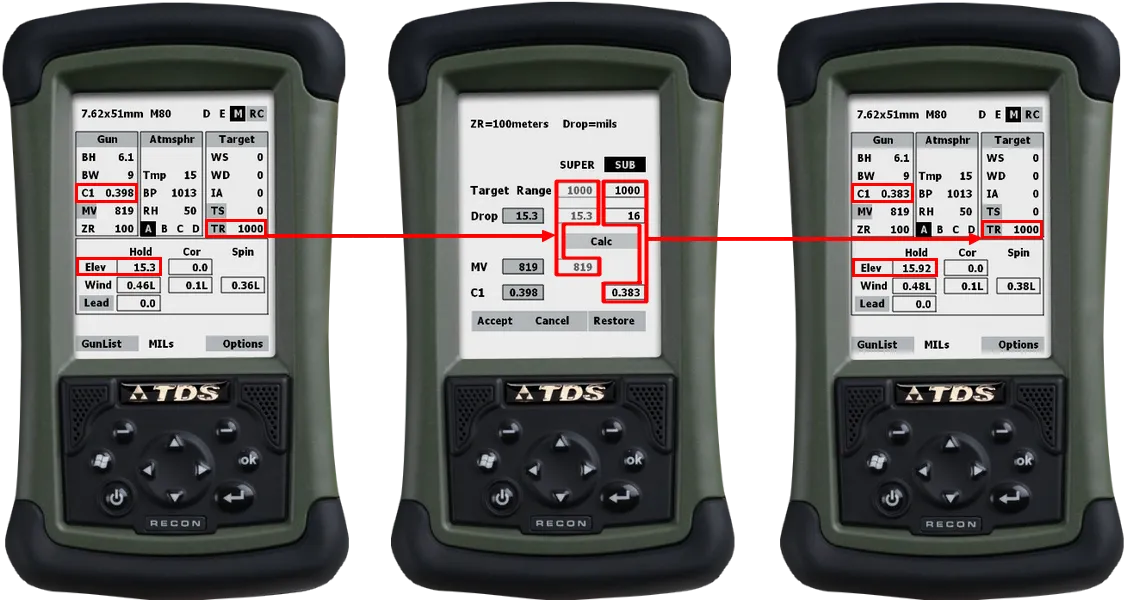
- If a new
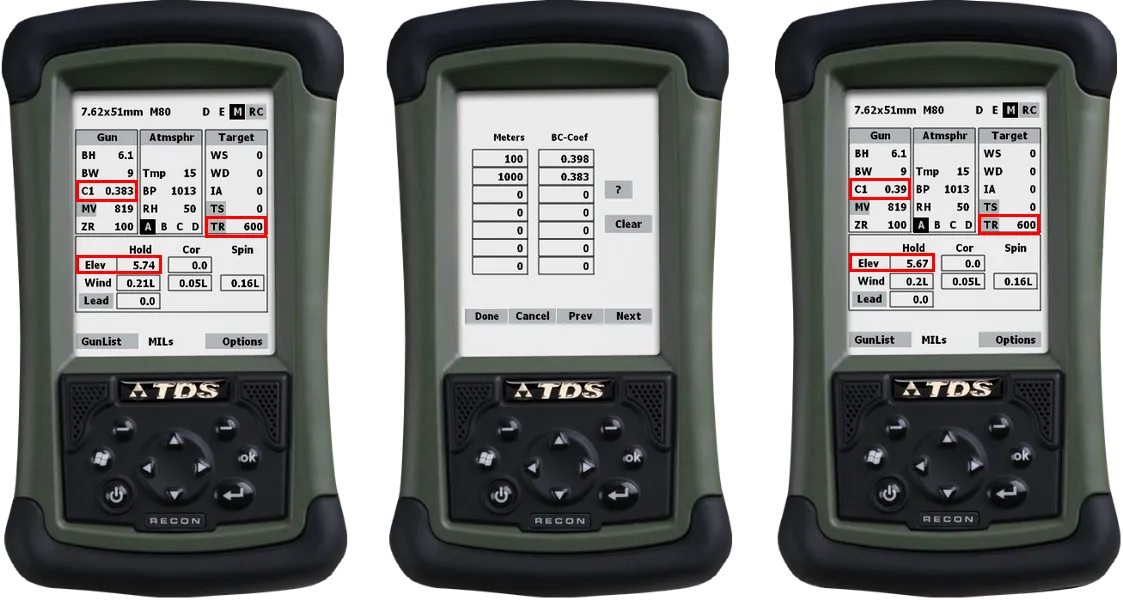
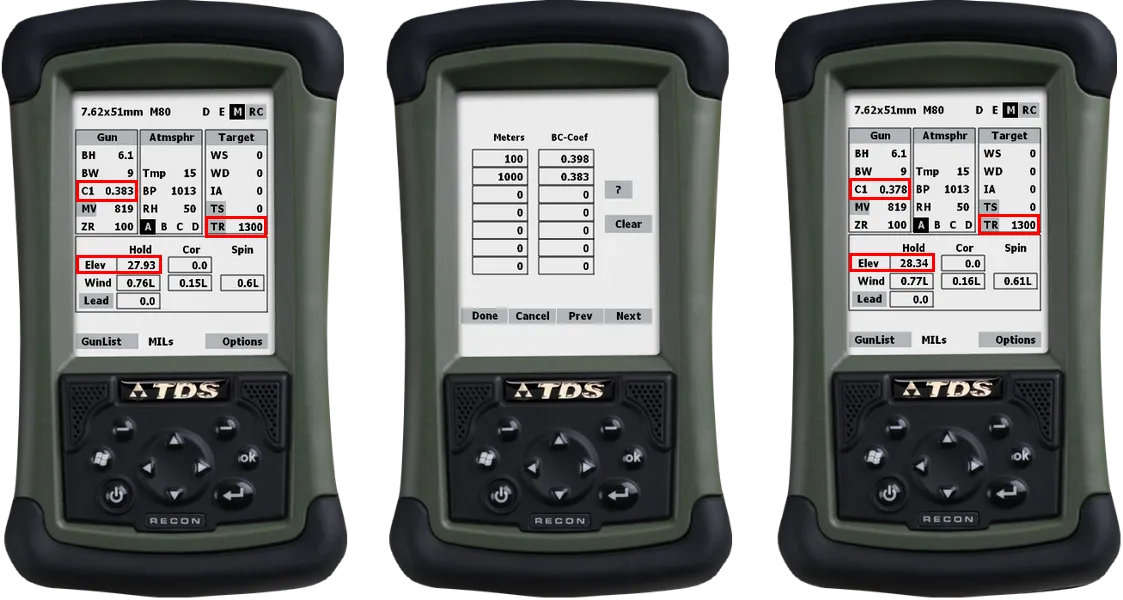
Target Rangeis applied in theTargetcolumn, the ballistic coefficientC1and the elevationElevwill be automatically recalculated.
3.4 Example with overwritten zero distance
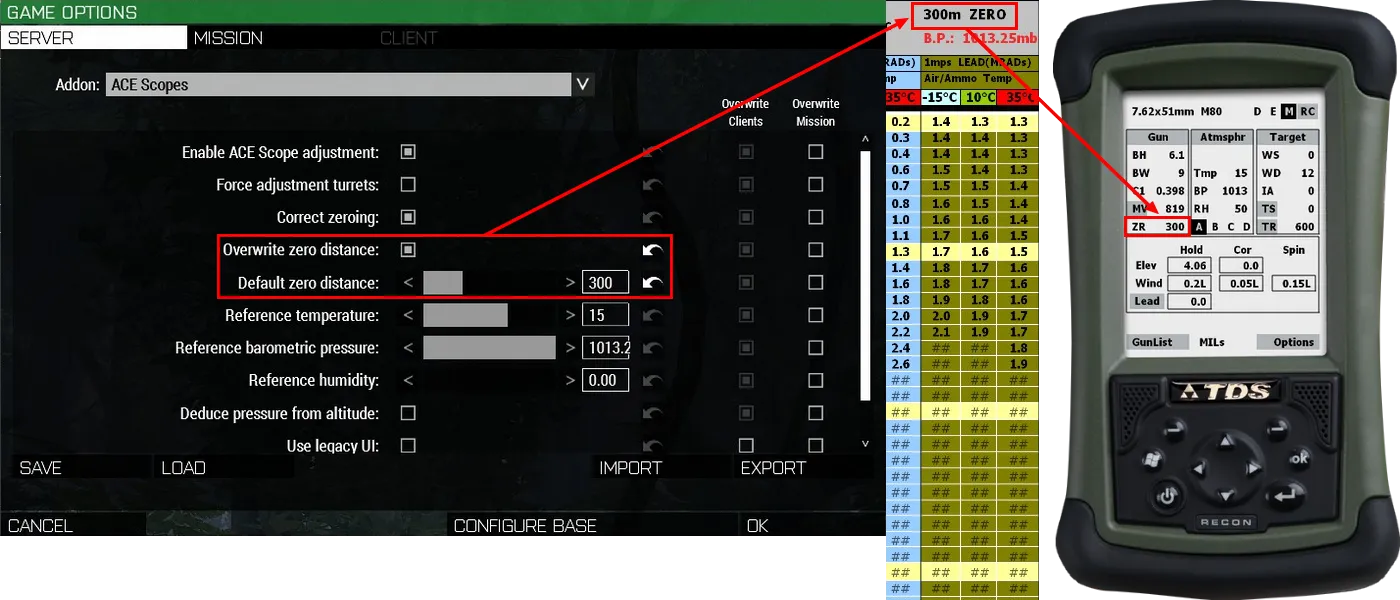
- The
Default zero distancecan be overwritten with the Scopes Options, the Scopes Framework or the CBA Settings System. - In this case, the Range Card will be automatically updated, NOT the AtragMx.
- Open the AtragMx and the
Atmsphrcolumn, selectDefaultandDone. [Manual] - Open the
Guncolumn, check and update theZero RangeandDone.
3.5 Example with Add New Gun in GunList
- Open the Range Card and check the bullet diameter, the bullet weight, the (bullet Class Name) and the muzzle velocities.
- Open the AtragMx and the
Atmsphrcolumn, selectDefaultandDone. [Manual] - Select
Add New Gunin theGunList. [Manual] - Add a
New Gun NameandOpen Gun. - Select
E(English unit) at the top right. [Manual] - Open the
Guncolumn, check and update theBullet Weight (grains), theBullet Diam (inches)andDone. - Select
M(Metric unit) at the top right. - Open the
Muz Vel Tablein theOptionsmenu or click onMVin theGuncolumn. - Edit manually the
Muzzle Velocity Tableaccording with the Range Card andDone. [Manual] - The
C1 coefficientof the bullet can be found with the Eden EditorConfig Viewer:
configfile » “CfgAmmo” » “bullet Class Name” » “ACE_ballisticCoefficients”
configfile » “CfgAmmo” » “bullet Class Name” » “ACE_dragModel”
- The AtragMx accepts only G1 ballistic coefficient.
- G7 ballistic coefficient can be converted, for example, with the online JBM Ballistics Calculators.
- Optionally,
Save GunandDonein theGunList.
Note: The ballistic coefficient can be calculated by using the 360 Degree Training Course mission as a chronograph at different distances and JBM Ballistics Calculators for example, an another ballistic software at your own convenience, or the AtragMx Truing Tool.
Example direct conversion with .408 Cheytac 305 grains G7 BC 0.279 at 2000 meters 15°C:
3.6 Adding ATragMX Presets
3.7 Reseting the AtragMx GunList
- Open the Eden Editor and the Extended Debug Console (Ctrl+D).
- Execute
call ace_atragmx_fnc_clear_user_data(LOCAL EXEC). - The original ACE3
GunListwill be restored (allAdd New Gunentries deleted).